Our work
What we build for manufacturers.
Five examples of the kind of work we do: what was painful, what we built, and how it helps. Different companies, different ERPs, the same approach.
We name clients only once they say yes, so the companies here are described rather than named. The software is real. Where a picture uses sample data, it says so.
01Plant visibility
See your whole plant, live, in 3D.
Our own product, for machine shops and plants
Before
Your ERP knows which machine is down, which job is late and what is waiting at the dock. Nobody can see it all at once, so managers walk the floor to find out.
What we built
- A 3D view of the plant in the browser, with every machine showing its status and every rack showing real stock.
- Click anything to see what is behind it, or replay the day to see exactly what happened and when.
- It reads from the systems you already have. Nothing changes in your ERP.
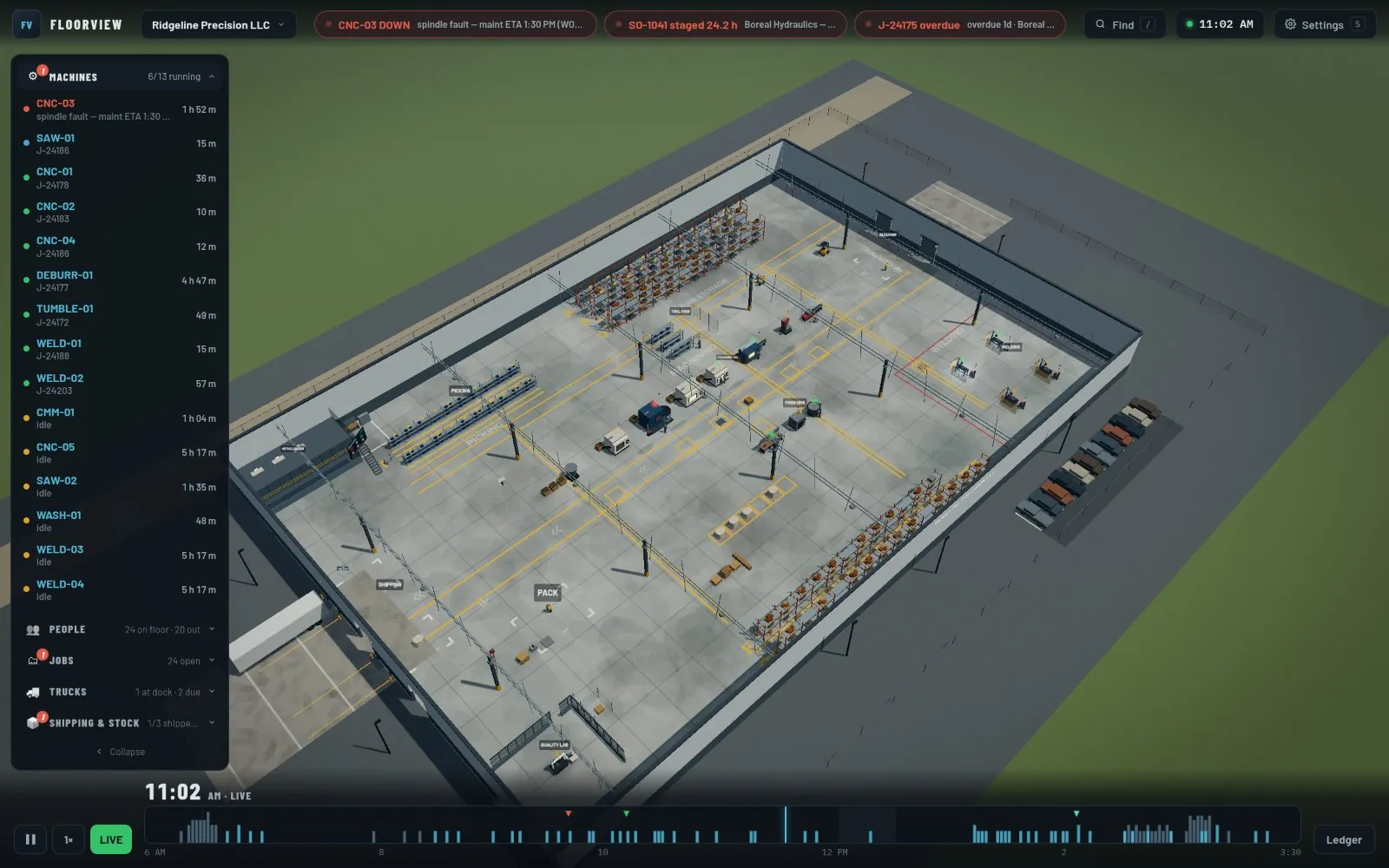
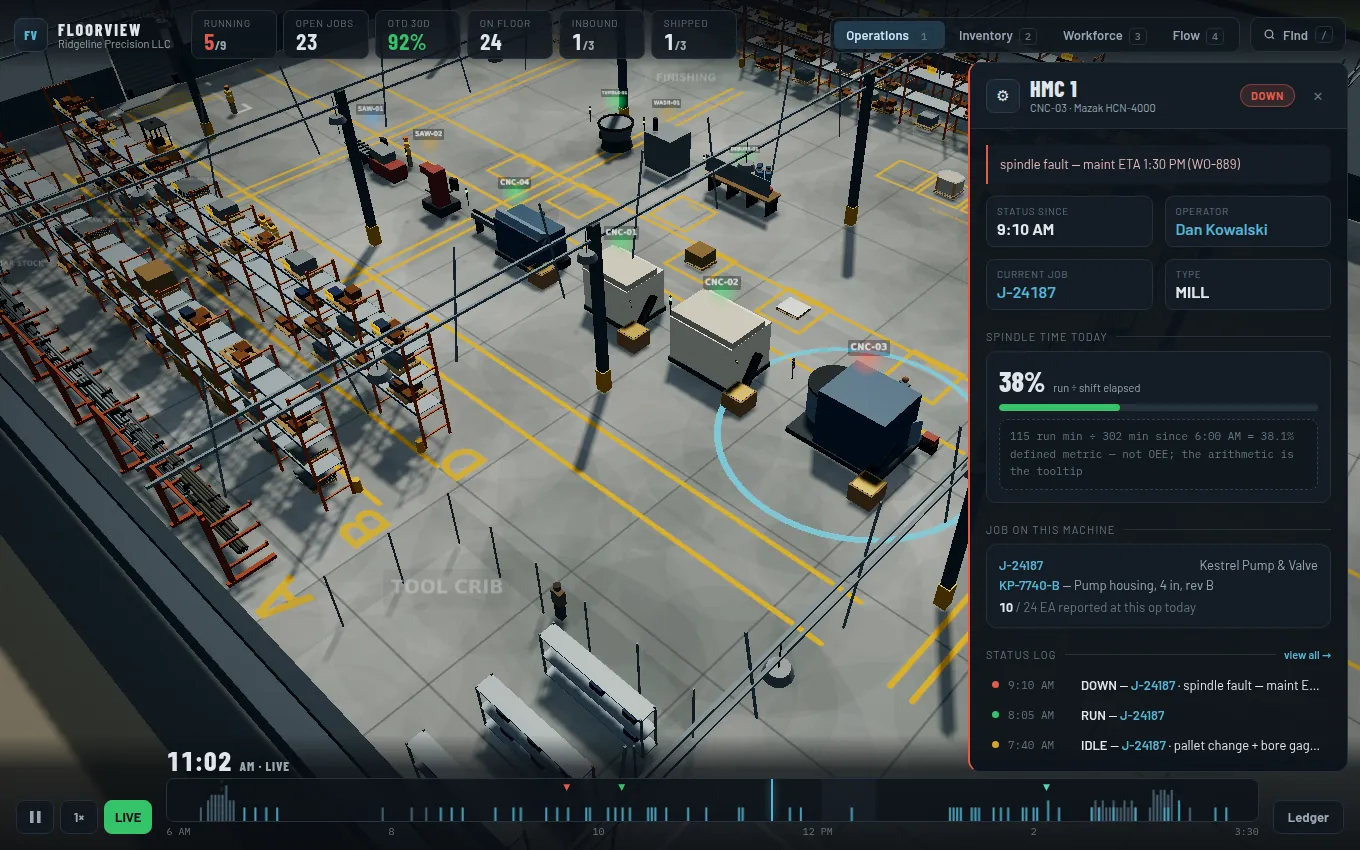
Real screenshots. The plant is FloorView’s fictional demo shop.
- machines, jobs, stock and people on one screen
- Livemachines, jobs, stock and people on one screen
- scrub back through the day like a video
- Replayscrub back through the day like a video
- connects without changing your ERP
- Read-onlyconnects without changing your ERP
- 3D
- Web app
- Your ERP data
02AI on your ERP
Ask your ERP a question in plain English, and get a straight answer.
For manufacturers and distributors
Before
Every question about the business turns into a report request. Someone exports to Excel, builds a pivot table, and the answer arrives days later.
What we built
- An AI assistant connected to your live business data. Ask about orders, inventory, customers or jobs the way you would ask a colleague.
- It shows how it got each answer, so you can check it rather than just trust it.
- Read-only by default, so it can look but not change anything. Your passwords are never shown to the AI.
SELECT o.order_no, o.customer, o.ship_date,
       SUM(l.qty * l.price) AS value
FROM sales_orders o JOIN order_lines l ...
WHERE o.status = 'OPEN' ...
Three orders, $61,915 in total. Kestrel Valve is the largest and ships Friday.
| Order | Customer | Ships | Value |
|---|---|---|---|
| 000412 | Northfield Pump | Tue | $18,240 |
| 000419 | Atlas Fluid Power | Wed | $12,600 |
| 000423 | Kestrel Valve | Fri | $31,075 |
Illustration with sample data.
- no SQL, no report writer, no waiting
- Plain Englishno SQL, no report writer, no waiting
- answers from today’s data, not last week’s export
- Liveanswers from today’s data, not last week’s export
- it can look, but it cannot change anything
- Read-onlyit can look, but it cannot change anything
- AI assistant
- Live data
- Read-only
03Reporting
Reports and dashboards from live ERP data.
Our reporting platform, running on more than one ERP
Before
Reports lived in old report writers. Every new report, or a change to how an invoice looks, meant a developer, a software release and a wait.
What we built
- Dashboards, reports and printed documents like invoices and sales orders, all from live data.
- New reports and layouts go live in seconds, without a software release.
- Download anything as PDF or CSV, and decide who gets to see which report.
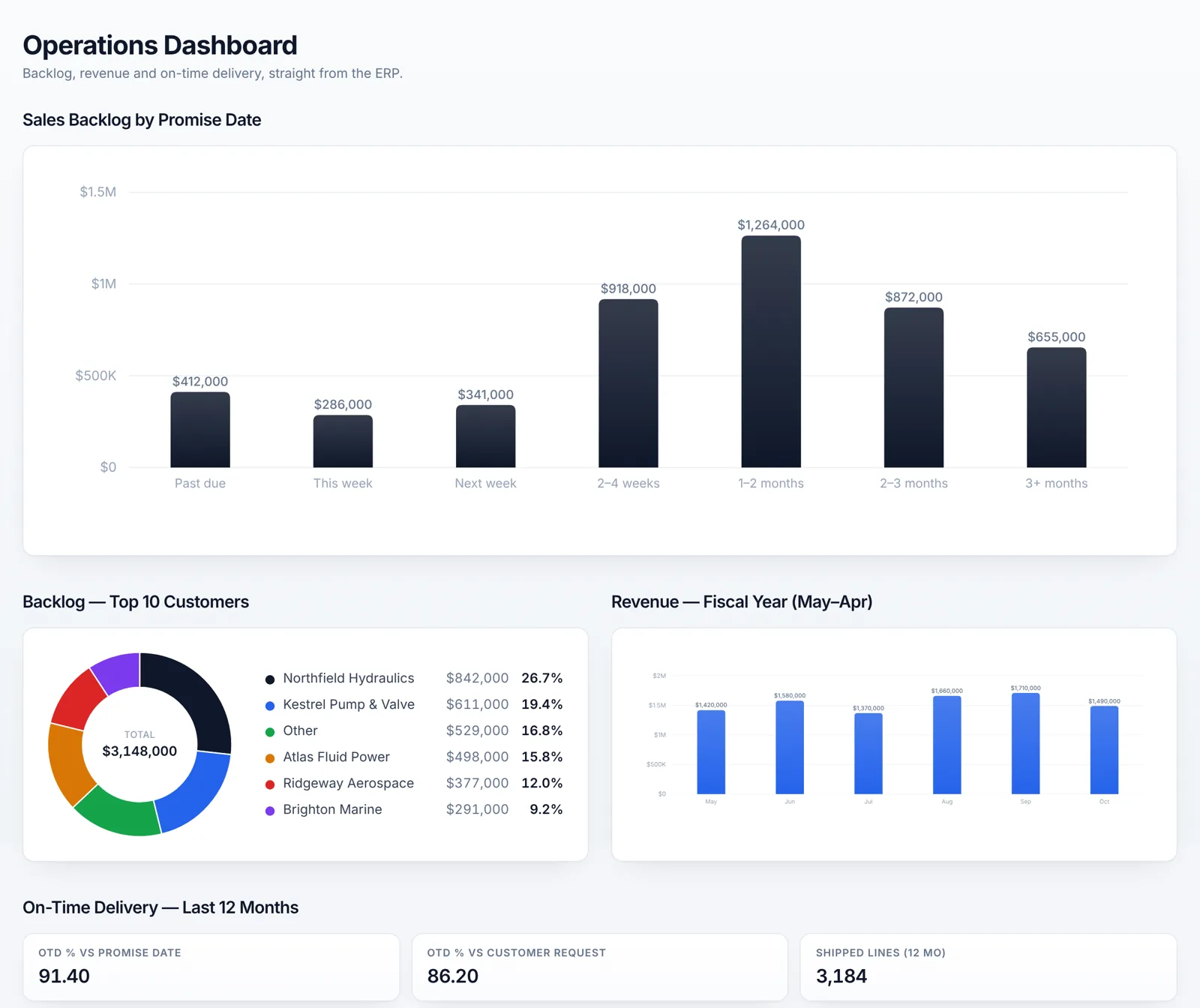
Real screen from the app, shown with sample data.
- numbers straight from your ERP
- Livenumbers straight from your ERP
- to publish a new report or layout
- Secondsto publish a new report or layout
- print it, or take it into Excel
- PDF · CSVprint it, or take it into Excel
- Dashboards
- Printed documents
- PDF and CSV
04Automation
Orders flow from Salesforce into the ERP on their own. Nobody retypes them.
A manufacturer that sells in Salesforce and builds in its ERP
Before
Sales closes an order in Salesforce. Then someone types it into the ERP again, sets up the production jobs by hand, and copies the order number back. Every step is a chance for a mistake.
What we built
- When an order closes in Salesforce, it is created in the ERP automatically, with production jobs already set up.
- The ERP order number goes back to Salesforce, so sales can see where things stand.
- A simple dashboard shows every order that came through, and anything that needs a person.
Salesforce
Order closed by sales
Our service
Runs next to the ERP, checks and translates
Sales order
Created in the ERP
Job per line
Raised automatically
Custom fields
Carried across
14
received today
14
sent back
0
waiting
Illustration with sample data.
- orders typed in twice
- 0orders typed in twice
- production jobs set up for every line
- Automaticproduction jobs set up for every line
- view of every order on its way through
- Liveview of every order on its way through
- Salesforce
- Your ERP
- Automation
05Shop floor
Operators clock time to jobs from any screen on the floor.
A CNC machining company
Before
Every hour on the floor has to land on the right job, or job costs are wrong. Clocking in meant a desktop program installed and kept up to date on every terminal.
What we built
- A simple web app any terminal, tablet or phone can open. Nothing to install.
- Operators sign in, pick the job and clock in. Clocking out records how many parts they made.
- Supervisors see who is clocked in, on what, and who has not clocked in yet. The time goes straight into the ERP.
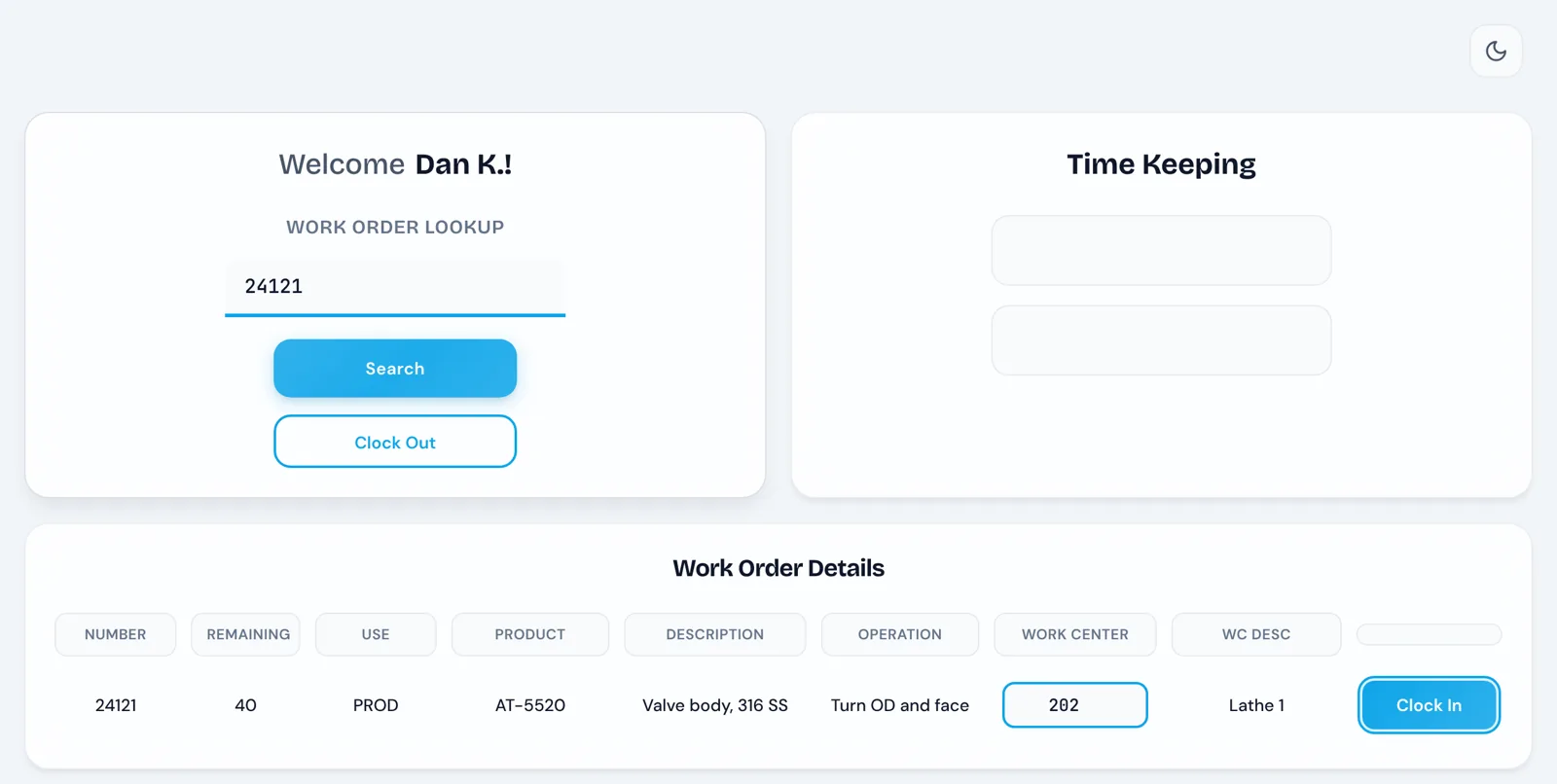
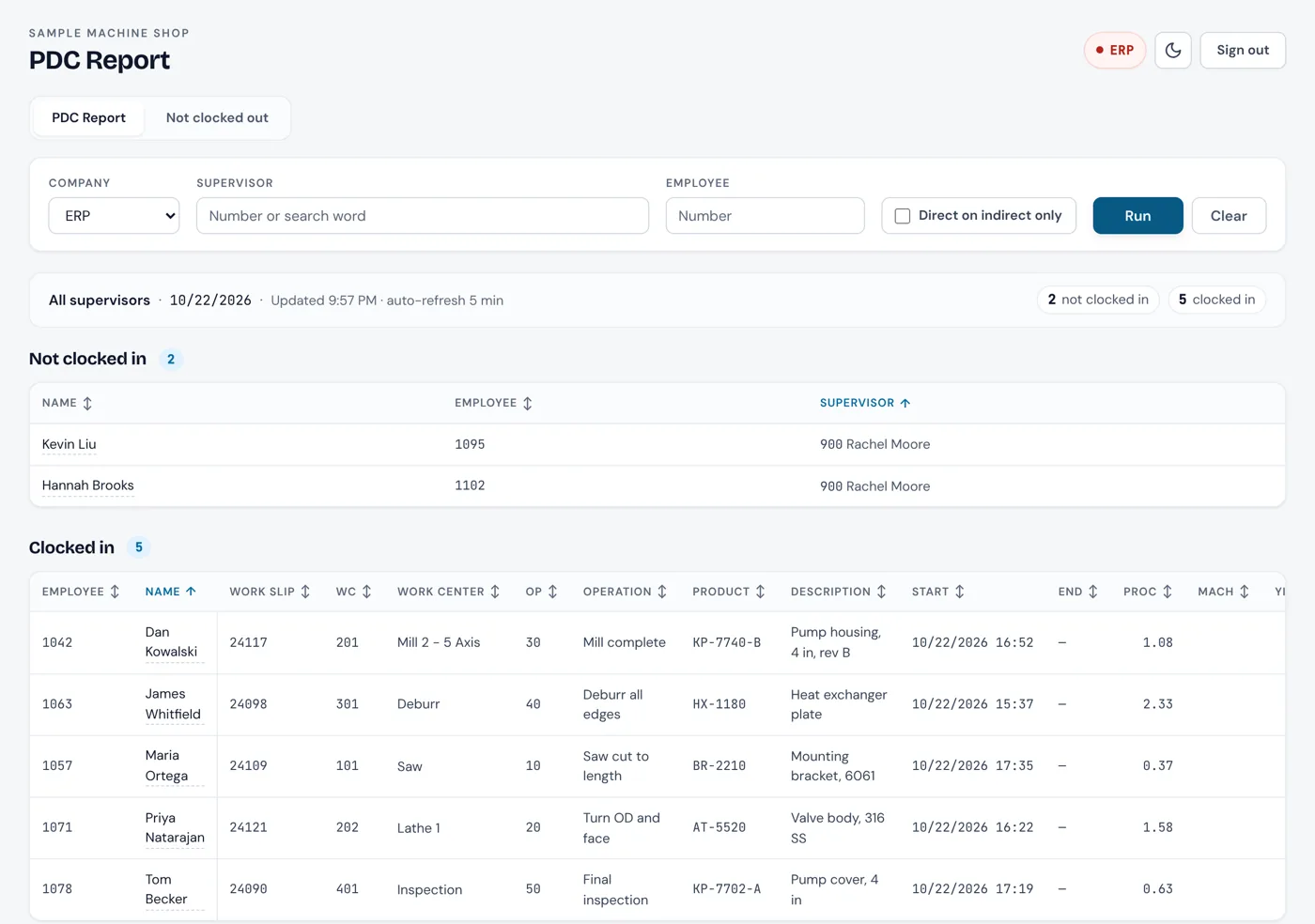
Real screens from the app, shown with sample data.
- terminal, tablet or phone
- Any screenterminal, tablet or phone
- who is working on what, right now
- Livewho is working on what, right now
- time goes straight into the ERP
- Directtime goes straight into the ERP
- Web app
- Tablets and terminals
- Your ERP
And more
Smaller builds, same idea.
Not every job is a big one. These are tools that quietly take a chore off someone every day.
Automation
EDI on autopilot
Shipping notices, order acknowledgements and invoices sent to trading partners automatically, with anything stuck flagged for a person.
Dashboards
Scorecards that explain themselves
Sales, purchasing and production dashboards where every number says, in plain English, where it came from.
Data
ERP data, ready for reporting
Your ERP data copied into a clean reporting database with readable names, and kept up to date on its own.
Modernization
Moving off Microsoft Access
An old Access database mapped out, forms, queries and all, so the move to something modern is planned instead of guessed.
AI
AI on your QuickBooks
Ask questions across several QuickBooks companies from one AI assistant, without copying anything into a spreadsheet.
Built for us
Our own support desk
Clients raise tickets, time is logged as the work happens, and invoices go out in a couple of clicks. We run Compass AI on it.
What they have in common
How we build every one of these.
Your ERP stays where it is
We build alongside the system you already run, using the ways your vendor supports. Nothing replaces it, and nothing goes around it.
Safe by default
Connections start read-only, so they can look but not change. Where something does change data, it is one clear, named action.
Made for the people using it
Plain labels, screens that fit the monitors on your floor, and nothing anyone needs a manual for.
Checked against real data
Every build is tested against your real data and history, so the numbers match the ones you already trust.
Let's talk
Want to see one of these running?
Thirty minutes with David. Tell us which one is closest to your problem and we will walk you through it, then give you a straight answer about what yours would take.